I. Introduction
Your Shopify store is live. Products are listed. Design looks great. But customers aren’t arriving — because no one can find you. That’s the silent killer for most e-commerce businesses in 2026, and the cure is a well-executed Shopify SEO checklist.
Search engine optimization isn’t a one-time task. It’s an ongoing system. According to BrightEdge, organic search drives over 53% of all website traffic across industries — and for e-commerce stores, that figure is even more critical because the intent behind organic searches is often transactional. People searching for “best running shoes under $100” aren’t browsing. They’re ready to buy.
This guide gives you a comprehensive, actionable Shopify SEO checklist covering every dimension of optimization: keyword research, on-page SEO, technical fixes, content strategy, off-page authority building, local SEO, and analytics. Whether you’re launching a new store or scaling an existing one, every section is packed with specific steps, real-world examples, and data-backed insights to put you ahead of the competition.
II. Understanding Shopify SEO
A. What Is SEO in the Context of E-Commerce?
SEO (Search Engine Optimization) is the discipline of making your web pages more discoverable and more credible to search engines like Google, Bing, and increasingly, AI-powered answer engines like Perplexity and ChatGPT. For Shopify stores specifically, SEO determines whether your product pages, collection pages, and blog posts appear when a potential buyer types in a search query.
E-commerce SEO has a direct and measurable impact on revenue. A single top-3 ranking for a high-intent keyword like “leather wallet for men” can generate thousands of visits — and conversions — every month without ongoing ad spend.
B. Key Components of SEO Relevant to Shopify
- Technical SEO — site speed, mobile-friendliness, crawlability
- On-Page SEO — title tags, meta descriptions, content quality
- Off-Page SEO — backlinks, brand mentions, social signals
- Content SEO — blog strategy, keyword targeting, topical authority
- Local SEO — Google Business Profile, geo-targeted keywords
C. The Impact of SEO on Online Growth
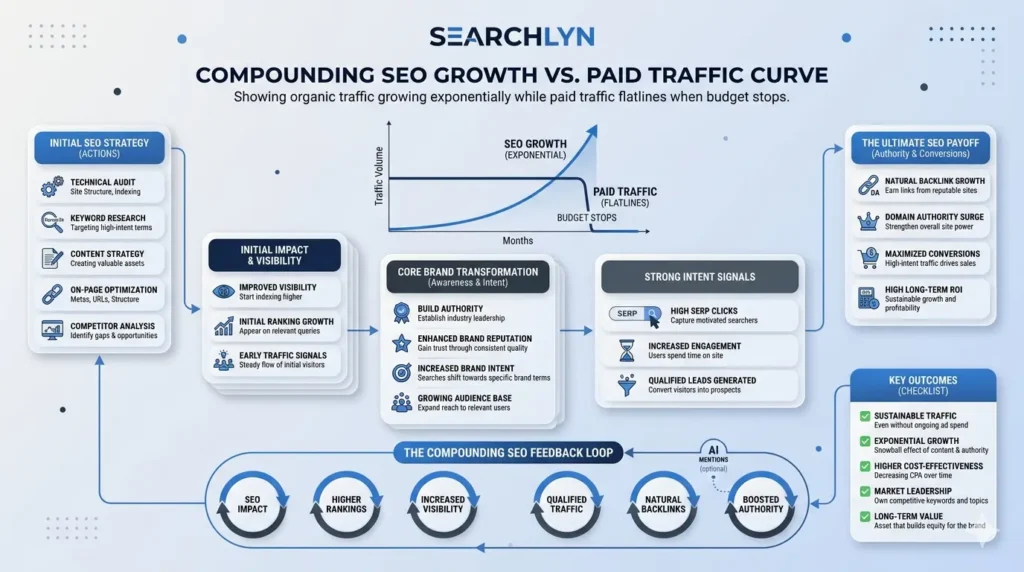
According to a study, stores that invest in SEO see an average 2.8x increase in organic traffic within 12 months of consistent optimization. Unlike paid ads where traffic stops the moment you pause spending, SEO compounds over time — every well-optimized page you publish is an asset that continues delivering visitors indefinitely.
III. Keyword Research
A. Why Keyword Research Is the Foundation of Every SEO Strategy
Keyword research tells you exactly what your potential customers are typing into Google. Without it, you’re optimizing for terms nobody searches for, or competing head-on with billion-dollar brands on impossibly competitive keywords. Good keyword research maps buyer intent to specific pages on your site.
For a Shopify store, keywords fall into three intent categories:
- Informational — “how to choose running shoes” (blog content)
- Navigational — “Nike Air Max on Shopify” (brand/product pages)
- Transactional — “buy leather sneakers online” (product + collection pages)
B. Best Tools for Shopify Keyword Research
Here are the most effective tools to identify keywords with real traffic potential:
| Tool | Best For | Pricing | Standout Feature |
| Ahrefs | Competitor gap analysis | From $99/mo | Keyword Difficulty score + SERP analysis |
| SEMrush | Full keyword suite | From $119/mo | Keyword Magic Tool with 25B+ keywords |
| Google Keyword Planner | Volume estimates | Free with Google Ads | Direct data from Google |
| Ubersuggest | Budget-friendly research | Free / From $29/mo | Long-tail suggestions |
| Screaming Frog | On-site keyword audit | Free up to 500 URLs | Crawl and extract keyword data |
| Shopify Search Analytics | Your own store data | Built-in | What visitors actually search on-site |
C. Finding Long-Tail Keywords for Shopify
Long-tail keywords — phrases of three or more words — are the backbone of a smart Shopify SEO strategy. They have lower search volume but dramatically higher conversion rates because the user intent is specific. Someone searching “waterproof hiking boots size 11 men” is much closer to purchasing than someone searching “hiking boots.”
Steps to uncover high-value long-tail keywords:
- Enter your seed keyword (e.g., “yoga mat”) in Ahrefs Keywords Explorer
- Filter for Keyword Difficulty (KD) under 20 to target winnable terms
- Check the “Questions” filter — questions are gold for FAQ and blog content
- Explore the “Also rank for” and “Also talk about” sections in Ahrefs
- Use Google’s “People Also Ask” and autocomplete suggestions for intent signals
- Analyze your top 3 competitors’ pages with Ahrefs Site Explorer to find keyword gaps
Pro Tip: In 2026, AI answer engines like Perplexity are increasingly surfacing content that answers questions comprehensively. Targeting question-based long-tails serves both traditional SEO and AEO simultaneously.
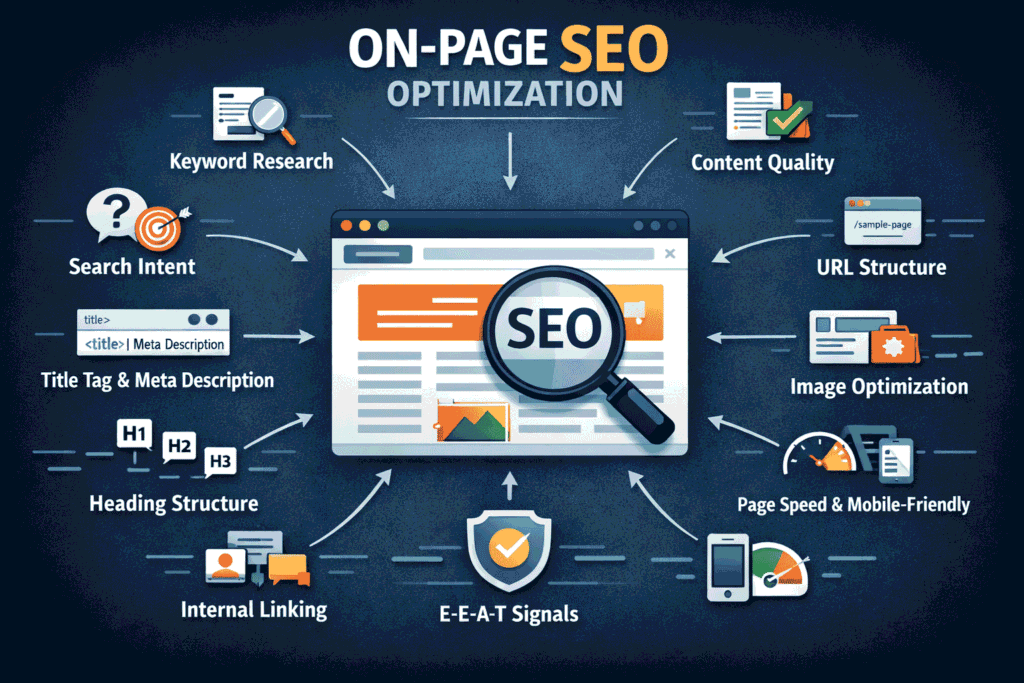
IV. On-Page SEO Optimization
A. Title Tags and Meta Descriptions
Your title tag is the single most important on-page ranking factor. For Shopify, every product page, collection page, and blog post needs a unique, keyword-optimized title tag. Shopify’s default titles are often weak — you need to customize them.
Title Tag Best Practices:
- Keep it between 55–65 characters to avoid truncation in search results
- Place your primary keyword near the beginning
- Include a differentiator (e.g., “Free Shipping”, “2026 Collection”, “Handmade”)
- Make it compelling — your title is a headline competing for a click
Meta Description Best Practices:
- Write 150–160 characters
- Include the primary keyword naturally
- Add a CTA: “Shop now”, “Order today”, “Explore the full range”
- Avoid duplicate meta descriptions across pages — Shopify auto-generates them from product copy if left blank
Example — Optimized vs. Default:
| Type | Default Shopify Title | Optimized Title |
| Product Page | Blue Yoga Mat – MyStore | Premium Blue Yoga Mat | Non-Slip, Extra Thick | Free Shipping |
| Collection | Yoga Mats – MyStore | Best Yoga Mats 2026 – Non-Slip, Eco-Friendly & Thick Options |
| Blog Post | Blog | MyStore | Yoga Mat Buying Guide 2026: How to Choose the Right Thickness |
B. URL Structure Best Practices
Shopify automatically generates URLs from your product names, but the defaults are often suboptimal. Shopify stores use a fixed URL structure — /products/, /collections/, /blogs/ — which you can’t change at the template level. However, you can and should customize the slug portion.
- Use hyphens, not underscores: /products/blue-yoga-mat not /products/blue_yoga_mat
- Keep URLs short and descriptive: /products/leather-wallet instead of /products/brown-genuine-leather-bifold-wallet-mens-2024
- Include the primary keyword in the slug
- Avoid dynamic parameters like ?variant=12345 in canonical URLs
- Set canonical tags to prevent duplicate content from variant pages
C. Image Optimization Techniques
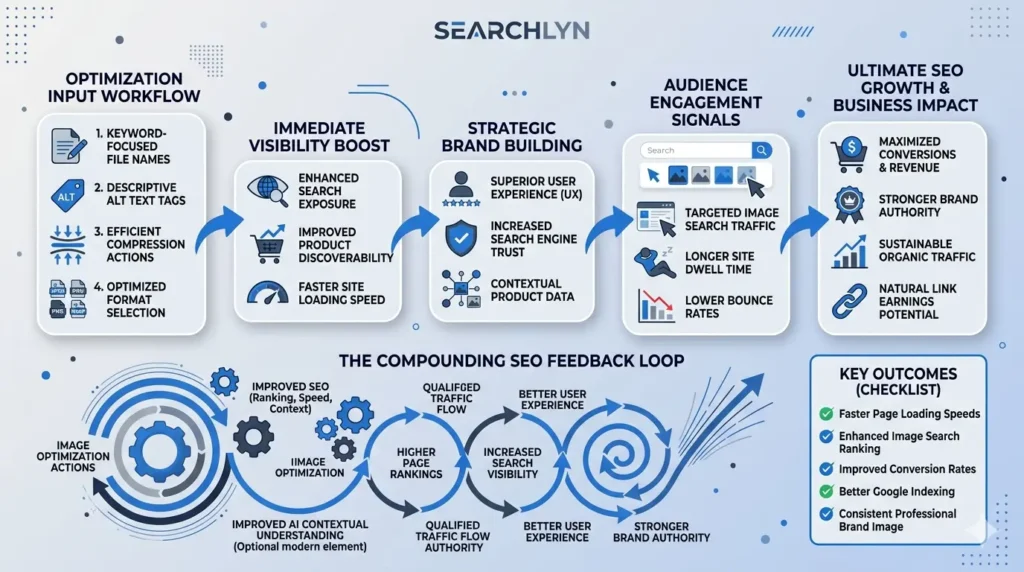
Images are one of the biggest untapped SEO opportunities on Shopify. Most stores upload high-resolution images without any optimization, resulting in slow load times and zero SEO value from alt text.
Shopify SEO Checklist for Images:
- Rename image files before uploading: use-descriptive-keyword-filenames.jpg
- Write descriptive alt text for every image — describe what’s in the image, include keyword naturally
- Compress images using tools like TinyPNG, Squoosh, or Shopify’s built-in WebP conversion
- Use WebP format where supported — typically 25–35% smaller than JPEG at comparable quality
- Add structured product schema that includes image markup
- Use lazy loading for below-the-fold images to improve Core Web Vitals
D. Internal Linking Strategies
Internal links distribute “link equity” across your site and help Google understand your site architecture. For Shopify, a strong internal linking strategy connects product pages to collection pages, blog posts to relevant products, and high-authority pages to pages you want to rank.
- Link from blog posts to relevant product/collection pages with descriptive anchor text
- Build a logical category hierarchy: Home → Collection → Product
- Add a “Related Products” section on every product page
- Link to your most important pages from the homepage and navigation
- Use keyword-rich anchor text — avoid generic “click here” links
V. Content Creation and Blogging
A. Why Quality Content Is Non-Negotiable for Shopify SEO
Google’s Helpful Content System, introduced and refined through 2022–2025, explicitly rewards content that demonstrates first-hand experience and genuine expertise. Thin product descriptions and copied manufacturer content won’t cut it. To compete in 2026, Shopify stores need content that actually helps buyers make decisions.
According to HubSpot’s State of Marketing Report, companies that blog consistently generate 55% more website visitors than those that don’t. For e-commerce, that translates directly to more potential customers entering your funnel — without paying for a single ad.
B. Building a Blog Strategy for Your Shopify Store
Your Shopify blog isn’t just a branding exercise — it’s a traffic acquisition engine. Every post you publish should target a specific keyword, answer a real user question, and link to at least one product or collection on your store.
Content Framework for Shopify Blogging:
| Content Type | Target Intent | Example Topic | Links To |
| Buying Guide | Commercial | “Best Running Shoes for Flat Feet 2026” | Running shoes collection |
| How-To Post | Informational | “How to Clean Suede Sneakers at Home” | Sneaker care products |
| Comparison | Commercial | “Nike vs Adidas Running Shoes: Which Is Better?” | Both brand pages |
| Listicle | Informational | “10 Must-Have Yoga Accessories for Beginners” | Yoga accessories collection |
| FAQ Article | Informational | “What Size Yoga Mat Do I Need?” | Yoga mats product page |
Publishing Cadence: Aim for a minimum of 2 well-researched posts per week. Quality always beats quantity — a 2,000-word comprehensive guide outperforms 10 thin 300-word posts in 2026’s search landscape.
C. Leveraging User-Generated Content (UGC)
User-generated content — reviews, photos, Q&As submitted by customers — is one of the most powerful but underutilized SEO assets in e-commerce. Google increasingly weighs E-E-A-T signals (Experience, Expertise, Authoritativeness, Trustworthiness), and authentic customer reviews directly demonstrate the Experience and Trustworthiness components.
- Enable product reviews on your Shopify store (apps like Judge.me or Yotpo work well)
- Encourage photo reviews — they add visual content and demonstrate real product use
- Respond publicly to reviews to signal engagement and trust
- Use review schema markup to display star ratings in SERPs — this dramatically boosts CTR
- Repurpose UGC in blog posts as social proof
VI. Technical SEO for Shopify
A. Site Speed Optimization
Google has made page experience a confirmed ranking factor, with Core Web Vitals as the measurable benchmark. A slow Shopify store doesn’t just frustrate visitors — it loses rankings. According to Google, a 1-second delay in mobile load time can reduce conversions by up to 20%.
Core Web Vitals Targets (2026 Benchmarks):
| Metric | What It Measures | Good Score | Improvement Tactic |
| LCP (Largest Contentful Paint) | Page loading speed | Under 2.5 seconds | Compress hero images, use CDN |
| INP (Interaction to Next Paint) | Responsiveness | Under 200 milliseconds | Defer non-critical JavaScript |
| CLS (Cumulative Layout Shift) | Visual stability | Under 0.1 | Set explicit image dimensions |
| TTFB (Time to First Byte) | Server response time | Under 800ms | Upgrade Shopify plan, use fast theme |
Shopify SEO Checklist for Speed Optimization:
- Audit your theme — bloated themes (especially with excessive app scripts) are the #1 speed killer
- Limit installed apps to only those you actively use; each app typically adds 30-200ms load time
- Enable Shopify’s built-in image CDN (automatic on all plans)
- Defer or async-load third-party scripts (chat widgets, analytics, etc.)
- Use Google PageSpeed Insights and GTmetrix to identify specific bottlenecks
- Consider Shopify’s Dawn theme or Turbo theme — both are performance-optimized
B. Mobile Responsiveness
Mobile commerce (m-commerce) accounted for 60% of all e-commerce sales in 2025, according to Statista. Google uses mobile-first indexing — meaning it crawls and indexes the mobile version of your Shopify store as the primary version. If your mobile experience is poor, your rankings suffer regardless of how good the desktop experience is.
- Test your store at Google’s Mobile-Friendly Test (search.google.com/test/mobile-friendly)
- Ensure tap targets (buttons, links) are at least 48x48px
- Use readable font sizes — minimum 16px for body text on mobile
- Avoid horizontal scrolling — all content should fit within the viewport
- Test the checkout flow specifically on multiple mobile devices
C. XML Sitemaps and Robots.txt
Shopify automatically generates an XML sitemap at yourstore.com/sitemap.xml and a robots.txt file. While the defaults are reasonable, you need to understand how they work to avoid accidental indexation of low-value pages.
Sitemap best practices:
- Submit your sitemap in Google Search Console under Sitemaps
- Verify that all important product, collection, and blog pages are included
- Shopify generates dynamic sitemaps — check that new pages appear within 24 hours
Robots.txt considerations for Shopify:
- Shopify’s default robots.txt blocks /cart, /checkout, /orders, and admin pages — this is correct
- Be careful editing robots.txt — Shopify introduced custom robots.txt.liquid in 2021; use it carefully
- Never block your product, collection, or blog pages from crawling
D. Fixing Broken Links and 404 Errors
404 errors waste your crawl budget and damage user experience. When you delete a product or restructure your store’s URL hierarchy, the old URLs break — and any backlinks pointing to those dead pages lose their value.
- Use Google Search Console > Coverage > 404 errors to identify broken pages
- Set up 301 redirects in Shopify (Online Store > Navigation > URL Redirects) for every deleted or moved URL
- Audit internal links with Screaming Frog to catch any site-wide broken links
- Check your backlink profile in Ahrefs for any high-value links pointing to dead pages and redirect them
VII. Off-Page SEO Strategies
A. Building Backlinks for Your Shopify Store
Backlinks remain one of Google’s top three ranking factors. A single high-quality backlink from an authoritative domain — a major publication, industry blog, or government site — can move the needle more than dozens of on-page optimizations. For Shopify stores, the challenge is building links that are editorially earned, not purchased.
Proven Backlink Strategies for Shopify:
| Strategy | How It Works | Difficulty | Link Quality |
| Digital PR | Create newsworthy data studies or surveys, pitch to journalists | High | Extremely high (DR 70+) |
| HARO/Connectively | Answer journalist queries as an expert source | Medium | High (national publications) |
| Guest Posting | Publish posts on industry blogs with a link back | Medium | Medium-High |
| Broken Link Building | Find broken links on other sites, offer your content as replacement | Medium | Medium-High |
| Resource Page Outreach | Get listed on curated resource pages in your niche | Low-Medium | Medium |
| Supplier/Partner Links | Request links from brands you stock or partner with | Low | Medium |
B. Social Media Integration
Social media signals are not a direct ranking factor, but they amplify your SEO efforts significantly. When your content gets shared widely, it gains exposure to potential link builders, journalists, and bloggers — who may then link to it organically.
- Add social sharing buttons to every blog post and product page
- Share new blog content immediately across all relevant platforms
- Engage with niche communities (Reddit, Facebook Groups, LinkedIn) by sharing valuable content
- Pin your best-performing content on Pinterest — Pinterest drives significant e-commerce traffic and has strong SEO crawling
- Use Instagram and TikTok to drive brand search volume — branded searches are an indirect ranking signal
C. Influencer Marketing and Partnerships
Influencer collaborations serve dual purposes: brand awareness and link acquisition. When a genuine influencer writes a review post linking to your Shopify store, that editorial backlink carries real SEO weight — especially if their blog has established domain authority.
- Prioritize micro-influencers (10K–100K followers) in your niche — they typically have higher engagement and are more willing to create genuine review content
- Negotiate for a blog post review with a dofollow link, not just an Instagram post
- Pursue co-branded content (e.g., gift guides, round-up posts) with complementary brands
- Offer affiliate programs — affiliate bloggers almost always link to your store
VIII. Local SEO for Shopify Stores
A. Why Local SEO Matters Even for Online Stores
If your Shopify store has a physical retail location — or if you target customers in specific geographic markets — local SEO is critical. According to study, 76% of people who search for something nearby visit a business within one day. Even for online-first stores, targeting city- or region-specific keywords can capture high-intent local buyers who prefer shopping with local businesses.
B. Google Business Profile Optimization
Your Google Business Profile (formerly Google My Business) is the most important local SEO asset you own. A fully optimized profile can place your store in Google’s Local Pack — the map results that appear at the very top of local searches.
Google Business Profile Checklist:
- Claim and verify your profile at business.google.com
- Add complete NAP information (Name, Address, Phone) — must match your website exactly
- Choose the most specific primary category for your business
- Upload at least 10 high-quality photos of your store, products, and team
- Collect and respond to Google Reviews regularly
- Add products and services with keyword-rich descriptions
- Post updates at least once per week using Google Posts
- Enable messaging and Q&A, and respond promptly
C. Local Keyword Targeting
Integrate geo-modifiers into your Shopify content and metadata for location-based searches:
- Create location-specific landing pages (e.g., /collections/yoga-mats-new-york)
- Optimize your homepage title and meta description to include your city
- Build local citations on Yelp, Bing Places, Apple Maps, and niche directories
- Target “near me” queries by including your city/region in product descriptions
- Build backlinks from local news sites, chambers of commerce, and community blogs
IX. Monitoring and Analytics
A. Tools for Tracking SEO Performance
You can’t improve what you don’t measure. Every Shopify store’s SEO program needs a consistent monitoring stack to track rankings, traffic, technical health, and conversions.
| Tool | Primary Use | Cost | Integration with Shopify |
| Google Search Console | Rankings, impressions, CTR, crawl errors | Free | Native via Shopify preferences |
| Google Analytics 4 | Traffic, conversions, revenue attribution | Free | Via Shopify GA4 integration |
| Ahrefs | Backlink monitoring, rank tracking | From $99/mo | Manual / API |
| SEMrush | Full-spectrum SEO monitoring | From $119/mo | Manual |
| Screaming Frog | Technical audits, crawl analysis | Free / £259/yr | Manual crawl |
B. Key Metrics to Monitor
Focus on metrics that directly connect SEO activity to business outcomes:
- Organic Traffic — monthly visitors from search engines (track in GA4 and GSC)
- Keyword Rankings — position tracking for your target keywords (Ahrefs or SEMrush)
- Click-Through Rate (CTR) — percentage of impressions that result in clicks (GSC)
- Core Web Vitals scores — LCP, INP, CLS for both mobile and desktop (GSC)
- Backlink Profile Growth — new referring domains month-over-month (Ahrefs)
- Organic Revenue — revenue attributed to organic search sessions (GA4 e-commerce)
- Crawl Errors — 404s, redirect chains, blocked pages (GSC Coverage report)
- Indexed Pages — number of pages successfully indexed by Google (GSC)
C. Adjusting Strategies Based on Data
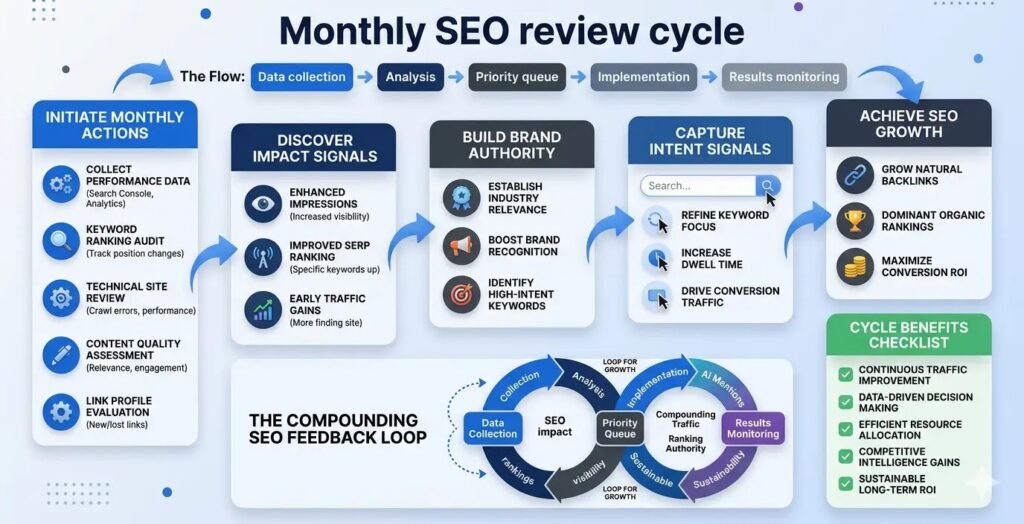
SEO data tells a story — but only if you know how to read it. Run a monthly SEO review with the following process:
- Pull GSC data: identify pages with high impressions but low CTR — these need better title tags and meta descriptions
- Identify your fastest-growing pages and double down — create related content, build more links to them
- Flag any page that has dropped more than 5 positions — audit it for content freshness and potential cannibalization
- Review your Core Web Vitals report for any newly failing URLs
- Check for new competitors entering your keyword space (Ahrefs SERP overview)
- Update your top-performing blog posts quarterly with new data, examples, and internal links
[INFOGRAPHIC: Monthly SEO review cycle — Data collection → Analysis → Priority queue → Implementation → Results monitoring]
X. Conclusion
SEO is the most powerful long-term growth lever available to any Shopify store owner. Unlike paid advertising, where your visibility evaporates the moment your budget runs out, SEO builds compounding equity — every optimized page, earned backlink, and well-researched blog post continues working for you indefinitely.
This Shopify SEO checklist covers the full spectrum of what it takes to rank, convert, and grow in 2026:
- Keyword research grounded in buyer intent
- On-page optimization of titles, meta descriptions, URLs, images, and internal links
- Technical health — speed, mobile, sitemaps, and 404 remediation
- Content strategy built to drive organic traffic and topical authority
- Off-page link building through digital PR, HARO, and influencer partnerships
- Local SEO for stores with geographic relevance
- Analytics-driven iteration using GSC, GA4, and Ahrefs
The stores that win in organic search aren’t the ones with the biggest budgets. They’re the ones that execute consistently, measure honestly, and adapt quickly. Start with the highest-impact items — keyword research, title tag optimization, and Core Web Vitals — and build from there.
SEO is a marathon, not a sprint. But with a clear Shopify SEO checklist and a systematic approach, every sprint you run compounds into sustainable, long-term organic growth.